Showing posts with label Comment Box. Show all posts

21 Feb 2013

How to Change Default Anonymous Avatar in Blogger Comments

In the past tutorial you've learned how you can change avatars size in blogger comments but this simple tutorial will show you how to change or customize default avatar of anonymous commenters or Blogger users with no photo added on their profiles. After Blogger announced new feature of threaded comment, we can still customize it by adding a jQuery plugin to our template and replacing the default anonymous avatar URL http://img1.blogblog.com/img/anon36.png and the one for blogger users http://img2.blogblog.com/img/b36-rounded.png with our own.


anonymous, default avatar, blogger blogspot

Step 1.

If you are using the old Blogger interface:
  • Go to Dashboard - Design - Edit HTML - Expand Widget Template (make a backup)
If you are using the new Blogger interface:
  • Go to Dashboard - Template - Edit HTML - Proceed - Expand Widget Template (make a backup)

Step 2. Find (CTRL + F) this code in your template:

</body>

Step 3. Add the following code just above it:

<script src='http://code.jquery.com/jquery-latest.js'/>
<script>
$(&quot;img[src=&#39;http://img1.blogblog.com/img/anon36.png&#39;]&quot;)
.attr(&#39;src&#39;, &#39;https://blogger.googleusercontent.com/img/b/R29vZ2xl/AVvXsEhWnB-Y0NgaaZw5Bdr8HHag4de6gU7iVeCwcyq61wDlZK6yvwTfCPKQ_II2t-Q9AxLgVod_UgsmPqkEoU7-8XPgci3tVxf6f4JJJvwO4ngCejdKnNrzbwbhRlI4EdQKXqGCkJKWn__jCF8/s1600/default_avatar.gif&#39;)
.ssyby(&#39;blank&#39;)
</script>
<script src='http://code.jquery.com/jquery-latest.js'/>
<script>
$(&quot;img[src=&#39;http://img2.blogblog.com/img/b36-rounded.png&#39;]&quot;)
.attr(&#39;src&#39;, &#39;https://blogger.googleusercontent.com/img/b/R29vZ2xl/AVvXsEhfblQ_CgJTyyNufw3c25558SDHbx2M0AZyfNRT6kvYKxeYTmuUkV94GWgF17JiG7rUX1gqJ_vnsiQXZ2lT68dmAhyphenhyphenIdJUThLX11WBGz4VNafbyb7g2ql-zh4K8dHQ1cYq1J7uXazZgLOw/s1600/blogger-user.png&#39;)
.ssyby(&#39;blank&#39;)
</script>

Step 4. Save the Template

How to change avatar:

For Anonymous users: Replace the code in red with the url address of your image
For Blogger users: Replace the URL in blue with your own.

You can choose one from these below (copy the url address):


https://blogger.googleusercontent.com/img/b/R29vZ2xl/AVvXsEhWnB-Y0NgaaZw5Bdr8HHag4de6gU7iVeCwcyq61wDlZK6yvwTfCPKQ_II2t-Q9AxLgVod_UgsmPqkEoU7-8XPgci3tVxf6f4JJJvwO4ngCejdKnNrzbwbhRlI4EdQKXqGCkJKWn__jCF8/s200/default_avatar.gif


https://blogger.googleusercontent.com/img/b/R29vZ2xl/AVvXsEiCnUYa6Ueur_a7dzN4P0FWH6So9SRluB7HcI7vSViI957E08OvY9DDhC5HRcgCqJ1k6HOySyQ9TWNGlhjltaTXXFnREQBA8V6r6zvUJNpNH8XxAAx18hxuqLJWVbsiDjPM5eF6pvunHaM/s1600/facebook.gif


https://blogger.googleusercontent.com/img/b/R29vZ2xl/AVvXsEgKxY3AFoR2Ats7QU7QXl2JT6HhdO8dJKrRx8sVFO_sP0dcxlCbJRxHcbGNvPzhS8nTy90CIaroWgnMxlpwRGMQDDrkQYV2cppg9OWgy-Am19gQ3PCalpujLiT5qVN10Dr8xO8r4-O0dcg/s1600/anonymous3.png



https://blogger.googleusercontent.com/img/b/R29vZ2xl/AVvXsEhpShLnbDFSQlfa7ChV-wIJr-xaCrTeHveKHYq4Wbss0QyoyUn_WW1BHok6oPqK0ejKLrpZ92Eg3XwqXxfygpyr-SKbUHrzpJdulngiL4mnYpg2TtUi8kp8AB3qXqLiW41P0Cv4VkK-6gXD/s1600/blogger-user.png

If you liked this post, please consider sharing it. Thanks!

14 Sept 2012

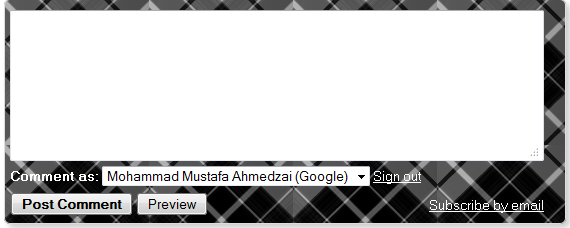
Background Patterns For Blogger Comment Box!

Add Background Theme To Your Blog
  1. Go To Blogger > Design > Edit HTML
  2. Backup your template
  3. Click the "Expand Widget Templates" box
  4. Search for this,
]]></b:skin>
    5.     Just above it paste this code,
#mbt-form iframe{
background:#ffffff url(IMAGE-LINK) repeat;
border:1px solid #ddd;
-moz-border-radius:6px;
-webkit-border-radius:6px;
box-shadow: 5px 5px 5px #CCCCCC;
padding:5px;
font:normal 12pt "ms sans serif", Arial;
color:#2F97FF;
width:560px; height:213px !important;
}
#mbt-form a{
color:#fff;
}
Replace IMAGE-LINK with any of the backgrounds you may choose from backgroundlabs website or the ones I have shared below.
To change the HEXADECIMAL color of the text "comment as" simply change #2F97FF and to change the width of the box then edit width:560px .
     6.    Next search for this,
<div class='comment-form'>
     7.   Replace it with the code below,
<div id='mbt-form'>
    8.   Save your template and you are all done!


Backgrounds and Patterns

Happy Christmas Background
IMAGE LINK:
http://www.backgroundlabs.com/backgrounds/318.jpg
Christmas Comment Box
GARDEN
http://www.backgroundlabs.com/backgrounds/40.jpg
garden
AQUA
http://www.backgroundlabs.com/backgrounds/434.gif
aqua
BLUE OCEAN
https://blogger.googleusercontent.com/img/b/R29vZ2xl/AVvXsEiijSJVDu-JGgfJ-cpvJXWSDylvTxn89fX3M7JrDMsPNhFcBAMSDhyY9PHZHKYjNCa7iTO9LzFOJWvNrS9-B1e4f36o71LsZ9dIL2m3Aeq-yjh_lHfLv8zacplwBAfWuykPY9wvdzIvSKDe/s400/1.png
blue ocean
CHECKER
https://blogger.googleusercontent.com/img/b/R29vZ2xl/AVvXsEj4_3tIIfAAE75fPoR8GHeARArlT1jjWfbm7QQ6635lxheQw3-dA3CTu9dX6lJyExGUZfqGEAWuDc3Tmd7LTbP1BWMCBhO04KTJfxaPTJB102KDjSPmLi95ZJowgjQKgnlj-N7ssnHL_bVt/s400/2.png

checker

CHALK
https://blogger.googleusercontent.com/img/b/R29vZ2xl/AVvXsEhk1dh9oP1mJ_o5LO9n4YO378-AN0-iD_6PA4kflkavDbPIpEWPee2qELOdpb2qOvbSWjX8Kvmfyh9xajR5mnyfoX-u8Z1lPqSNQIJVxul45dRX1k52r1gd7zoBPtFyljv44a6Q7VtjJgVy/s400/4.png
chalk
WOODEN
https://blogger.googleusercontent.com/img/b/R29vZ2xl/AVvXsEi_KDgsnZSJxuqDPSrU9HQjGc-KoclHdzGy0M4q3JR3s8hTD8kHJCHl8vrE3hTZfgnsPvDJQuhPeO-cWqZy64yRI0KkF9lH1-YhFQsDtRrwA9N6DH0CtXPSDebck2eL8uqc-BmgongLgb2V/s400/7.png
wooden

Blocks
https://blogger.googleusercontent.com/img/b/R29vZ2xl/AVvXsEhS-UgCMbXkjrCD-dxcr6mj8DOhu0chYaF4ZbHGQkUB1bCB-JNP_o-7KrXKsZ3QYS8pA2qQvxYQwoGFAtU_P6oz0X4u4J3epKBt1GOZoadglJ2ufHQLtj-J6zjzp7FOv7wgN7muws_isev-/s400/9.png
blocks
TILES
https://blogger.googleusercontent.com/img/b/R29vZ2xl/AVvXsEhNkRs_LvHs5ekt547YFznf2FIuiFQll1F_wxtL-VNRr1Krhyqj3JZMZhydhj-4MnkRskdRDkzhJwwJ-nuDIzNozUiKDBM149_8TlVEWP89G1D7owVi-krSOPGPagKnj-XTqch8S64ao2ck/s400/8.png
tiles
METALLIC
https://blogger.googleusercontent.com/img/b/R29vZ2xl/AVvXsEg-5WRt7dL1taSwMnC91gmzeI-x8inMiMA0r-fC2g1BUoYzMWQ2NfgdRUi_QICIN0GLn6iuBK2thIgwW40hYurmu9R2zM6vWdE5jubM0NOvG2tlok9qfAv1L-VduUaEp3_b0fhZtu9vYlsQ/s400/12.png   
metallic

11 Sept 2012

Customize Blogger Comment Box with Nice Background

Customize Blogger Comment Box 


This post about how to customize your comment box back ground.Actually default comment box isn't attractive.So most are like to change it.This is the tutorial for it.I made a post about How To Change Default Anonymous Avatar In Blogger Comments. You can follow this easy steps to  add it to your blog

1. Log in to blogger  Design > Edit HTML.

2. Find this tag by using Ctrl+F   ]]></b:skin>

3. Paste below code Before ]]></b:skin> tag


#mbt-form iframe{
background:#ffffff url(https://blogger.googleusercontent.com/img/b/R29vZ2xl/AVvXsEhH4chQHHApQBuKrOkTXFzCKfiTuiV1oInt1nMMWlnrcG5ZXNWWcPcs0B8hRHJVUeIDV2PGhmOO2CnL2bkmYkGoA-m7he5z9aFxF1itLTgh8VKU1HXhKrGNA7AxzsMWk1vkfVpwaLlXolLG/s400/11.png) repeat-x;
border:1px solid #ddd;
-moz-border-radius:6px;
-webkit-border-radius:6px;
box-shadow: 5px 5px 5px #CCCCCC;
padding:5px;
font:normal 12pt "ms sans serif", Arial;
color:#2F97FF;
width:560px; height:213px !important;
}
#mbt-form a{
color:#fff;
}

4. Find again this code by using Ctrl+F   <div class='comment-form'>

5.
Now replace <div class='comment-form'> with below code

 <div id='mbt-form'>

6. Now save your Template

You are done... 

8 Backgrounds For Customize Blogger Comment Box

8 Backgrounds For Customize Blogger Comment Box 


 In this post, im going help you to customize your blogger comment box with nice backgrounds.Actually this is great those who are trying to make your blog, attractive. Earlier
i posted about this, but today ill give more different styles.

1. Log in to blogger  Design > Edit HTML.

2. Find this tag by using Ctrl+F   ]]></b:skin>

3. Paste below code Before ]]></b:skin> tag

#mbt-form iframe{
background:#ffffff url(
https://blogger.googleusercontent.com/img/b/R29vZ2xl/AVvXsEhH4chQHHApQBuKrOkTXFzCKfiTuiV1oInt1nMMWlnrcG5ZXNWWcPcs0B8hRHJVUeIDV2PGhmOO2CnL2bkmYkGoA-m7he5z9aFxF1itLTgh8VKU1HXhKrGNA7AxzsMWk1vkfVpwaLlXolLG/s400/11.png) repeat-x;
border:1px solid #ddd;
-moz-border-radius:6px;
-webkit-border-radius:6px;
box-shadow: 5px 5px 5px #CCCCCC;
padding:5px;
font:normal 12pt "ms sans serif", Arial;
color:#2F97FF;
width:560px; height:213px !important;
}
#mbt-form a{
color:#fff;
}

4. Find again this code by using Ctrl+F   <div class='comment-form'>

5.
Now replace <div class='comment-form'> with below code
 

<div id='mbt-form'>

6. Now save your Template

Here is other backgrounds. you can change above code URL with below any URL.

https://blogger.googleusercontent.com/img/b/R29vZ2xl/AVvXsEjnI2j7ZvTp8jrAbY2FXW_9S4I8_kZrqGS3Ss40T2Lq4GNUO78V2Cmv2u7v33jRzhDgmAVHUHfJJ6qnIWhTT1DXKMBSvxZycsBxYemKnDBjXPFlTcxkbHook1kKpdmh5LLeDkHyFxxRXv0P/s1600/form1.JPG


https://blogger.googleusercontent.com/img/b/R29vZ2xl/AVvXsEgHlSjSvNEXPBHAoSBDh209odRD2uVsMupIhJaQqze8NIJIOgThr7TylRoz-2bPFbZ9rlnBcTjJVtNfBLMKL0JhSpLb11hCbra4k-H7gwMH5Ci5S23aC88ZaLlTOrSaHK5OUgbZ2JvHg-w-/s1600/form2.JPG


https://blogger.googleusercontent.com/img/b/R29vZ2xl/AVvXsEg3VJNZmGhODoyHo5eOoB4Lw5XaT4m3jyGrRL_mVBdF3cX_0QEE7Ap1aYYyfRRRcT60t0OBsnyXXfbCcd2GUd0G1LQOQ4m5RXm2uuWMLY4WW9yHaf43Ty5gUuCcHkTLAmGYxjXGKebVMeQV/s1600/form3.JPG


https://blogger.googleusercontent.com/img/b/R29vZ2xl/AVvXsEjsRVE_YJHUmRusTO-z2SVAbTbr8t5Ytay8ozanfMZO-xap3UfNDdE0b5ROUyYLWYVdQgPTMvRPpQ0qFFEJ8yaAGXuD5EWF11EZMaAZibhRFOlV4Oanim2zJX1oOv0Y_jEHIHiGSbX25CHr/s1600/form4.JPG


https://blogger.googleusercontent.com/img/b/R29vZ2xl/AVvXsEjAeLShPYWPokml0xrwlp05G0_sRrmFL2ggmlFoq2fN_HwGEztgMkHWLQKn48sTHL9rOqoalgyU79wND02o97kq1rwp9iYGWTSJCdI-yLzo2dbnEA838eXVmTGDXiOGNrLryL95hjFBjuPN/s1600/form5.JPG


https://blogger.googleusercontent.com/img/b/R29vZ2xl/AVvXsEgOa2Py8cQcrI1ku8Pe_0hM80R2LQ5SULw0GezTuYT1Z27h2Me51m0OFtnW6adrZHzdDe2S108SCvp8cFod-1skoe3xdG5NhENASI6IdDdfnfFkHXXhz37dZG9xbX0KJaK5VCz8ZmaYHyfa/s1600/form6.JPG


https://blogger.googleusercontent.com/img/b/R29vZ2xl/AVvXsEjnwY3DSUULDx_DymybUhFkvA00C2Z5_94_y646t9AIlw6ZaYDRN4K-rSCXTyvKE8aXLCARASHOdLUfgA3J39plHw3ZfDJvlcYRIR-_nPuaXj0MbXdJm9PmZ10guHxlNHrLQC_rjLIBscOn/s1600/form7.JPG


 https://blogger.googleusercontent.com/img/b/R29vZ2xl/AVvXsEibVORvoO1O2ijZQzZO8QljiKn9HlGU5Ho7-IKvG10tHt0dXtM37yytrzawEDbsKpPrbkpSCL-Wc1tFRpHtPisj2JhFKhdQpxeLOXnYC4FVRaEFE931KX-6Opt_SCe9dudjbISYJRJZNPSP/s1600/form8.JPG

Related Posts Plugin for WordPress, Blogger...

Subscribe Updates, Its FREE!