Showing posts with label PopUp. Show all posts

13 Sept 2012

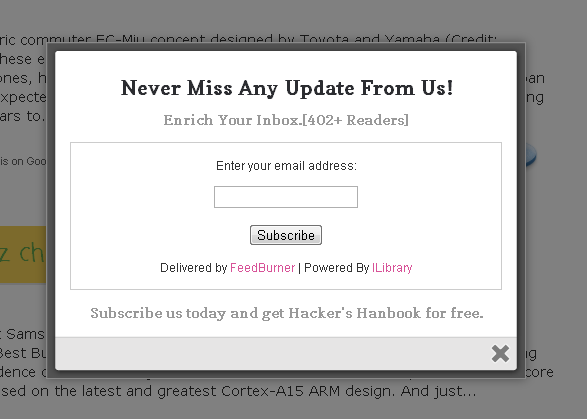
Make a Pop-up Subscribe Form Like Aweber

aweber subscribe formYou can Install This Widget Easily in your Blog By Following These Simple Steps....
Before you edit any template it's better to keep a Backup..
So First Backup your Template. Now

1.Go To Design
2.Edit Html
3.Select Expand Widgets...

Step 1 : The CSS You Need To Search The Following Piece Of Code By Pressing [Ctrl+F]
]]></b:skin>
Now Paste The Bellow Code Just Before it. 

/*
   ColorBox Core Style:
   The following CSS is consistent between example themes and should not be altered.
*/
#colorbox, #cboxOverlay, #cboxWrapper{position:absolute; top:0; left:0; z-index:9999; overflow:hidden;}
#cboxOverlay{position:fixed; width:100%; height:100%;}
#cboxMiddleLeft, #cboxBottomLeft{clear:left;}
#cboxContent{position:relative;}
#cboxLoadedContent{overflow:auto;}
#cboxTitle{margin:0;}
#cboxLoadingOverlay, #cboxLoadingGraphic{position:absolute; top:0; left:0; width:100%;}
#cboxPrevious, #cboxNext, #cboxClose, #cboxSlideshow{cursor:pointer;}
.cboxPhoto{float:left; margin:auto; border:0; display:block;}
.cboxIframe{width:100%; height:100%; display:block; border:0;}
/*

    User Style:
       Change the following styles to modify the appearance of ColorBox.  They are
       ordered & tabbed in a way that represents the nesting of the generated HTML.
    */
    #cboxOverlay{background:#000;opacity:0.5 !important;}
    #colorbox{
            box-shadow:0 0 15px rgba(0,0,0,0.4);
           -moz-box-shadow:0 0 15px rgba(0,0,0,0.4);
            -webkit-box-shadow:0 0 15px rgba(0,0,0,0.4);
           }
          #cboxTopLeft{width:14px; height:14px; background:url(https://blogger.googleusercontent.com/img/b/R29vZ2xl/AVvXsEgeN-F23s9tTNh11piNWGwFp6y_l8bSuemEHKR0Sb1ZyNl5qTTGI0_L8dN3ZZg1XSD2cWHG2OqmkEOZsJAA-2sJDz45ybiXj81uy8eHl0_sXfo5vJYLG99mAD10g_C2VV_12KZ7MAvsttA/s1600/controls.png) no-repeat 0 0;}
#cboxTopCenter{height:14px; background:url(https://blogger.googleusercontent.com/img/b/R29vZ2xl/AVvXsEi56gA71Ybrt4elScNrMFpV-F1RVs33L93T32R77nDMseXQHeM2dHi77cNZw3xLQqL_LoZVyQWNDLmMafvYBPpYW2xQ6SAAH4hLtn7hfMw_tFN4uB26_qea70Amd5DENTMC5ir_91bGorw/s400/border.png) repeat-x top left;}
    #cboxTopRight{width:14px; height:14px; background:url(https://blogger.googleusercontent.com/img/b/R29vZ2xl/AVvXsEgeN-F23s9tTNh11piNWGwFp6y_l8bSuemEHKR0Sb1ZyNl5qTTGI0_L8dN3ZZg1XSD2cWHG2OqmkEOZsJAA-2sJDz45ybiXj81uy8eHl0_sXfo5vJYLG99mAD10g_C2VV_12KZ7MAvsttA/s1600/controls.png) no-repeat -36px 0;}
    #cboxBottomLeft{width:14px; height:43px; background:url(https://blogger.googleusercontent.com/img/b/R29vZ2xl/AVvXsEgeN-F23s9tTNh11piNWGwFp6y_l8bSuemEHKR0Sb1ZyNl5qTTGI0_L8dN3ZZg1XSD2cWHG2OqmkEOZsJAA-2sJDz45ybiXj81uy8eHl0_sXfo5vJYLG99mAD10g_C2VV_12KZ7MAvsttA/s1600/controls.png) no-repeat 0 -32px;}
    #cboxBottomCenter{height:43px; background:url(https://blogger.googleusercontent.com/img/b/R29vZ2xl/AVvXsEi56gA71Ybrt4elScNrMFpV-F1RVs33L93T32R77nDMseXQHeM2dHi77cNZw3xLQqL_LoZVyQWNDLmMafvYBPpYW2xQ6SAAH4hLtn7hfMw_tFN4uB26_qea70Amd5DENTMC5ir_91bGorw/s400/border.png) repeat-x bottom left;}
    #cboxBottomRight{width:14px; height:43px; background:url(https://blogger.googleusercontent.com/img/b/R29vZ2xl/AVvXsEgeN-F23s9tTNh11piNWGwFp6y_l8bSuemEHKR0Sb1ZyNl5qTTGI0_L8dN3ZZg1XSD2cWHG2OqmkEOZsJAA-2sJDz45ybiXj81uy8eHl0_sXfo5vJYLG99mAD10g_C2VV_12KZ7MAvsttA/s1600/controls.png) no-repeat -36px -32px;}
    #cboxMiddleLeft{width:14px; background:url(https://blogger.googleusercontent.com/img/b/R29vZ2xl/AVvXsEgeN-F23s9tTNh11piNWGwFp6y_l8bSuemEHKR0Sb1ZyNl5qTTGI0_L8dN3ZZg1XSD2cWHG2OqmkEOZsJAA-2sJDz45ybiXj81uy8eHl0_sXfo5vJYLG99mAD10g_C2VV_12KZ7MAvsttA/s1600/controls.png) repeat-y -175px 0;}
    #cboxMiddleRight{width:14px; background:url(https://blogger.googleusercontent.com/img/b/R29vZ2xl/AVvXsEgeN-F23s9tTNh11piNWGwFp6y_l8bSuemEHKR0Sb1ZyNl5qTTGI0_L8dN3ZZg1XSD2cWHG2OqmkEOZsJAA-2sJDz45ybiXj81uy8eHl0_sXfo5vJYLG99mAD10g_C2VV_12KZ7MAvsttA/s1600/controls.png) repeat-y -211px 0;}
    #cboxContent{background:#fff; overflow:visible;}
        #cboxLoadedContent{margin-bottom:5px;}
        #cboxLoadingOverlay{background:url(https://blogger.googleusercontent.com/img/b/R29vZ2xl/AVvXsEjDdqgGzXSO-YbIdvxKmyJhPP_79u0ORHpoORWith3HSJWvT_iQS9Ity4Mt60_S6KMSM707wMBIzqre0rUA2htBPn_dju2ZlcfwL9jxWeaoJleS9FWHM-g2oXcEsGhTfPctEATl_i9m03k/s400/loadingbackground.png) no-repeat center center;}
        #cboxLoadingGraphic{https://blogger.googleusercontent.com/img/b/R29vZ2xl/AVvXsEjv6ETwl76EjBbMVmvvsByUE5dGoFkCkPF4yDE6uq6p-CeMSjGkD2OnbiUJffjEAbwZfwNKhgBXg4beZcgkizxngN7IJx3zqlwlcJPn1FfqUq9UT3liU9hmZfrfgyH4B7kQ5cHmjxPFK3s/s400/loading.gif) no-repeat center center;}
        #cboxTitle{position:absolute; bottom:-25px; left:0; text-align:center; width:100%; font-weight:bold; color:#7C7C7C;}
        #cboxCurrent{position:absolute; bottom:-25px; left:58px; font-weight:bold; color:#7C7C7C;}
        #cboxPrevious, #cboxNext, #cboxClose, #cboxSlideshow{position:absolute; bottom:-29px; background:url(https://blogger.googleusercontent.com/img/b/R29vZ2xl/AVvXsEgeN-F23s9tTNh11piNWGwFp6y_l8bSuemEHKR0Sb1ZyNl5qTTGI0_L8dN3ZZg1XSD2cWHG2OqmkEOZsJAA-2sJDz45ybiXj81uy8eHl0_sXfo5vJYLG99mAD10g_C2VV_12KZ7MAvsttA/s1600/controls.png) no-repeat 0px 0px; width:23px; height:23px; text-indent:-9999px;}
        #cboxPrevious{left:0px; background-position: -51px -25px;}
        #cboxPrevious.hover{background-position:-51px 0px;}
        #cboxNext{left:27px; background-position:-75px -25px;}
        #cboxNext.hover{background-position:-75px 0px;}
        #cboxClose{right:0; background-position:-100px -25px;}
        #cboxClose.hover{background-position:-100px 0px;}
        .cboxSlideshow_on #cboxSlideshow{background-position:-125px 0px; right:27px;}
        .cboxSlideshow_on #cboxSlideshow.hover{background-position:-150px 0px;}
        .cboxSlideshow_off #cboxSlideshow{background-position:-150px -25px; right:27px;}
        .cboxSlideshow_off #cboxSlideshow.hover{background-position:-125px 0px;}

/*-----------------------------------------------------------------------------------*/
/*    box popup
/*-----------------------------------------------------------------------------------*/
#subscribe {
    font: 12px/1.2 Arial,Helvetica,san-serif;
}
#subscribe a,
#subscribe a:hover,
#subscribe a:visited {
    text-decoration:none;
}
.box-title {
   color: #2C2D31;
   font-size: 20px;
   font-weight: bold;
   margin: 10px 0;
   text-align: center;
}
.box-tagline {
   color: #999;
   font-size: 14px;
   margin: 0;
   text-align: center;
}
#subs-container {
    padding: 35px 0 30px 0;
    position: relative;
}
.box-side {
    width: 170px;
    text-align: center;
}
.box-side.left {
   padding: 0 30px 0 15px;
    border-right: 1px solid #ecedf3;
}
.box-side.right {
    float: right;
   margin-top: -223px;
    margin-right: 10px;
}
.box-icon {
    width: 72px;
    height: 54px;
    padding: 6px 0 0 0;
    margin: 0 auto;
}
.box-icon a.rss{
    display: block;
    width: 70px;
    height: 56px;
    margin: 0 auto;
}
.box-icon a{
    display: block;
    width: 72px;
    height: 54px;   
}
.box-icon a.email img,
.box-icon a.rss img {
   margin: -5px 0 0;
    border: 0 none;
}
.box-side h4,
.box-side h4 a {
    font-size: 14px;
    line-height: 14px;
    color: #f26535;
    font-weight: bold;
}
.box-side h4 { margin: 20px 0 10px 0; }
.box-side h5 {
    font-size: 11px;
    color: #5e6066;
    line-height: 18px;
    margin: 0 0 20px 0;
}
a.sub {
   background: url("http://imgboot.com/images/cybersidh/subscribebutton.png") no-repeat scroll 0 0 transparent;
   color: #996633;
   display: block;
   height: 44px;
   line-height: 29px;
   margin: 0 auto;
   text-indent: -999em;
   width: 130px;
}
.box-side h4 a:hover {
    color: #f26535;
}
#box-or {
   background: #fff;
   font-size: 12px;
   font-weight: bold;
   height: 25px;
   line-height: 25px;
   margin: -115px 0 0 208px;
   position: absolute;
   width: 20px;
}
a:link, a:visited {
border:none;
}
.demo {
display:none;
}

Now Hit Prievew, If Every Thing Works Fine then Save The Template..

Step 2 : The Html In This Part you'll add the widget to your Blog !!
Goto :: Design>Page Elements>Add Gadget>Html/Javascript
Now Paste The Following Code In It. 

<script src='http://ajax.googleapis.com/ajax/libs/jquery/1.5/jquery.min.js'></script>
<script src="http://sidharth12.googlecode.com/files/jquery.colorbox-min.js"></script>
<script type="text/javascript">
jQuery(document).ready(function(){
   if (document.cookie.indexOf('visited=true') == -1) {
       var fifteenDays = 1000*60*60*24*15;
       var expires = new Date((new Date()).valueOf() + fifteenDays);
       document.cookie = "visited=true;expires=" + expires.toUTCString();
   $.colorbox({width:"480px", inline:true, href:"#subscribe"});
       }
});
</script>
    <!-- This contains the hidden content for inline calls -->
    <div style='display:none'>
        <div id='subscribe' style='padding:10px; background:#fff;'>
        <h2 class="box-title">Never Miss Any Update From Us!</h2>
               <h2 class="box-tagline">Enrich Your Inbox.[402+ Readers]</h2><br/>
               <form style="border:1px solid #ccc;padding:3px;text-align:center;" action="http://feedburner.google.com/fb/a/mailverify" method="post" target="popupwindow" onsubmit="window.open('http://feedburner.google.com/fb/a/mailverify?uri=ILibrary', 'popupwindow', 'scrollbars=no,width=560,height=540');return true"><p>Enter your email address:</p><p><input type="text" style="width:140px" name="email"/></p><input type="hidden" value="ILibrary" name="uri"/><input type="hidden" name="loc" value="en_US"/><input type="submit" value="Subscribe" /><p>Delivered by <a href="http://feedburner.google.com" target="_blank">FeedBurner</a> | Powered By <a href="http://www.mybloggertricks.com">MBT</a></p></form>
        <br/><h2 class="box-tagline">Subscribe us today and get Quality Articles for free.</h2>
</div>
</div>

Important :
Remove The Red Colored ILibrary With You FeedBurner ID.
Ignore The Line In Pink If Your Blog Already has JQuery.
 

Add Facebook Likebox Popup To Blogger


Facebook Likebox popup


Add Facebook Likebox Popup To Blogger


  1. Go To Blogger > Design
  2. Click choose a gadget
  3. Select HTML/javascript widget
  4. Paste the following code inside it 
<style>
    /* Jquery Facebook Likebox Popup Version 2.0 by MBT    MyBloggerTricks.com
    */
    #colorbox, #cboxOverlay, #cboxWrapper{position:absolute; top:0; left:0; z-index:9999; overflow:hidden;}
    #cboxOverlay{position:fixed; width:100%; height:100%;}
    #cboxMiddleLeft, #cboxBottomLeft{clear:left;}
    #cboxContent{position:relative;}
    #cboxLoadedContent{overflow:auto;}
    #cboxTitle{margin:0;}
    #cboxLoadingOverlay, #cboxLoadingGraphic{position:absolute; top:0; left:0; width:100%;}
    #cboxPrevious, #cboxNext, #cboxClose, #cboxSlideshow{cursor:pointer;}
    .cboxPhoto{float:left; margin:auto; border:0; display:block;}
    .cboxIframe{width:100%; height:100%; display:block; border:0;}
    /*

       User Style:
       Change the following styles to modify the appearance of ColorBox.  They are
       ordered & tabbed in a way that represents the nesting of the generated HTML.
    */
    #cboxOverlay{background:#000;opacity:0.5 !important;}
    #colorbox{
            box-shadow:0 0 15px rgba(0,0,0,0.4);
           -moz-box-shadow:0 0 15px rgba(0,0,0,0.4);
            -webkit-box-shadow:0 0 15px rgba(0,0,0,0.4);
           }
      
   #cboxTopLeft{width:14px; height:14px; background:url(https://blogger.googleusercontent.com/img/b/R29vZ2xl/AVvXsEgeN-F23s9tTNh11piNWGwFp6y_l8bSuemEHKR0Sb1ZyNl5qTTGI0_L8dN3ZZg1XSD2cWHG2OqmkEOZsJAA-2sJDz45ybiXj81uy8eHl0_sXfo5vJYLG99mAD10g_C2VV_12KZ7MAvsttA/s1600/controls.png) no-repeat 0 0;}
#cboxTopCenter{height:14px; background:url(https://blogger.googleusercontent.com/img/b/R29vZ2xl/AVvXsEi56gA71Ybrt4elScNrMFpV-F1RVs33L93T32R77nDMseXQHeM2dHi77cNZw3xLQqL_LoZVyQWNDLmMafvYBPpYW2xQ6SAAH4hLtn7hfMw_tFN4uB26_qea70Amd5DENTMC5ir_91bGorw/s400/border.png) repeat-x top left;}
    #cboxTopRight{width:14px; height:14px; background:url(https://blogger.googleusercontent.com/img/b/R29vZ2xl/AVvXsEgeN-F23s9tTNh11piNWGwFp6y_l8bSuemEHKR0Sb1ZyNl5qTTGI0_L8dN3ZZg1XSD2cWHG2OqmkEOZsJAA-2sJDz45ybiXj81uy8eHl0_sXfo5vJYLG99mAD10g_C2VV_12KZ7MAvsttA/s1600/controls.png) no-repeat -36px 0;}
    #cboxBottomLeft{width:14px; height:43px; background:url(https://blogger.googleusercontent.com/img/b/R29vZ2xl/AVvXsEgeN-F23s9tTNh11piNWGwFp6y_l8bSuemEHKR0Sb1ZyNl5qTTGI0_L8dN3ZZg1XSD2cWHG2OqmkEOZsJAA-2sJDz45ybiXj81uy8eHl0_sXfo5vJYLG99mAD10g_C2VV_12KZ7MAvsttA/s1600/controls.png) no-repeat 0 -32px;}
    #cboxBottomCenter{height:43px; background:url(https://blogger.googleusercontent.com/img/b/R29vZ2xl/AVvXsEi56gA71Ybrt4elScNrMFpV-F1RVs33L93T32R77nDMseXQHeM2dHi77cNZw3xLQqL_LoZVyQWNDLmMafvYBPpYW2xQ6SAAH4hLtn7hfMw_tFN4uB26_qea70Amd5DENTMC5ir_91bGorw/s400/border.png) repeat-x bottom left;}
    #cboxBottomRight{width:14px; height:43px; background:url(https://blogger.googleusercontent.com/img/b/R29vZ2xl/AVvXsEgeN-F23s9tTNh11piNWGwFp6y_l8bSuemEHKR0Sb1ZyNl5qTTGI0_L8dN3ZZg1XSD2cWHG2OqmkEOZsJAA-2sJDz45ybiXj81uy8eHl0_sXfo5vJYLG99mAD10g_C2VV_12KZ7MAvsttA/s1600/controls.png) no-repeat -36px -32px;}
    #cboxMiddleLeft{width:14px; background:url(https://blogger.googleusercontent.com/img/b/R29vZ2xl/AVvXsEgeN-F23s9tTNh11piNWGwFp6y_l8bSuemEHKR0Sb1ZyNl5qTTGI0_L8dN3ZZg1XSD2cWHG2OqmkEOZsJAA-2sJDz45ybiXj81uy8eHl0_sXfo5vJYLG99mAD10g_C2VV_12KZ7MAvsttA/s1600/controls.png) repeat-y -175px 0;}
    #cboxMiddleRight{width:14px; background:url(https://blogger.googleusercontent.com/img/b/R29vZ2xl/AVvXsEgeN-F23s9tTNh11piNWGwFp6y_l8bSuemEHKR0Sb1ZyNl5qTTGI0_L8dN3ZZg1XSD2cWHG2OqmkEOZsJAA-2sJDz45ybiXj81uy8eHl0_sXfo5vJYLG99mAD10g_C2VV_12KZ7MAvsttA/s1600/controls.png) repeat-y -211px 0;}
    #cboxContent{background:#fff; overflow:visible;}
        #cboxLoadedContent{margin-bottom:5px;}
        #cboxLoadingOverlay{background:url(https://blogger.googleusercontent.com/img/b/R29vZ2xl/AVvXsEjDdqgGzXSO-YbIdvxKmyJhPP_79u0ORHpoORWith3HSJWvT_iQS9Ity4Mt60_S6KMSM707wMBIzqre0rUA2htBPn_dju2ZlcfwL9jxWeaoJleS9FWHM-g2oXcEsGhTfPctEATl_i9m03k/s400/loadingbackground.png) no-repeat center center;}
        #cboxLoadingGraphic{https://blogger.googleusercontent.com/img/b/R29vZ2xl/AVvXsEjv6ETwl76EjBbMVmvvsByUE5dGoFkCkPF4yDE6uq6p-CeMSjGkD2OnbiUJffjEAbwZfwNKhgBXg4beZcgkizxngN7IJx3zqlwlcJPn1FfqUq9UT3liU9hmZfrfgyH4B7kQ5cHmjxPFK3s/s400/loading.gif) no-repeat center center;}
        #cboxTitle{position:absolute; bottom:-25px; left:0; text-align:center; width:100%; font-weight:bold; color:#7C7C7C;}
        #cboxCurrent{position:absolute; bottom:-25px; left:58px; font-weight:bold; color:#7C7C7C;}
        #cboxPrevious, #cboxNext, #cboxClose, #cboxSlideshow{position:absolute; bottom:-29px; background:url(https://blogger.googleusercontent.com/img/b/R29vZ2xl/AVvXsEgeN-F23s9tTNh11piNWGwFp6y_l8bSuemEHKR0Sb1ZyNl5qTTGI0_L8dN3ZZg1XSD2cWHG2OqmkEOZsJAA-2sJDz45ybiXj81uy8eHl0_sXfo5vJYLG99mAD10g_C2VV_12KZ7MAvsttA/s1600/controls.png) no-repeat 0px 0px; width:23px; height:23px; text-indent:-9999px;}
        #cboxPrevious{left:0px; background-position: -51px -25px;}
        #cboxPrevious.hover{background-position:-51px 0px;}
        #cboxNext{left:27px; background-position:-75px -25px;}
        #cboxNext.hover{background-position:-75px 0px;}
        #cboxClose{right:0; background-position:-100px -25px;}
        #cboxClose.hover{background-position:-100px 0px;}
        .cboxSlideshow_on #cboxSlideshow{background-position:-125px 0px; right:27px;}
        .cboxSlideshow_on #cboxSlideshow.hover{background-position:-150px 0px;}
        .cboxSlideshow_off #cboxSlideshow{background-position:-150px -25px; right:27px;}
        .cboxSlideshow_off #cboxSlideshow.hover{background-position:-125px 0px;}

    /*-----------------------------------------------------------------------------------*/
    /*   Facebook Likebox popup For Blogger Version 2.0
    /*-----------------------------------------------------------------------------------*/
    #subscribe {
        font: 12px/1.2 Arial,Helvetica,san-serif; color:#666;
    }
    #subscribe a,
    #subscribe a:hover,
    #subscribe a:visited {
        text-decoration:none;
    }
    .box-title {
       color: #F66303;
       font-size: 18px !important;
       font-weight: bold;
       margin: 10px 0;
    border:1px solid #ddd;
    -moz-border-radius:6px;
    -webkit-border-radius:6px;
    border-radius:6px;
    box-shadow: 5px 5px 5px #CCCCCC;
    padding:10px;
    line-height:25px; font-family:arial !important;
    }

    .box-tagline {
       color: #999;
       margin: 0;
       text-align: center;
    }
    #subs-container {
        padding: 35px 0 30px 0;
        position: relative;
    }
    a:link, a:visited {
    border:none;
    }
    .demo {
    display:none;
    }

/* ---------MBT Subscribe Form---------- */
    .box-title1 {
    border:1px solid #ddd;
    -moz-border-radius:6px;
    -webkit-border-radius:6px;
    border-radius:6px;
    box-shadow: 5px 5px 5px #CCCCCC;
        padding:10px;
  margin: 10px 0;
    }

    .enteryouremail{
background: #fff !important;
border: 1px solid #d2d2d2;
padding: 0px 8px 0px 8px;
color: #a19999; font-size: 12px;
height: 25px; width: 165px;
border-radius: 5px;
-moz-border-radius: 5px;
-webkit-border-radius: 5px;
margin:0px;
}
    .submitbutton{
background:#F66303;
border: 1px solid #F66303;
text-shadow: 1px 1px 1px #333;
box-shadow: 3px 3px 3px #666;
font:bold 12px Arial, sans-serif;
color: #fff;
height: 25px;
padding: 0 12px 0 12px;
margin: 0 0 0 5px;
border-radius: 5px;
-moz-border-radius: 5px;
-webkit-border-radius: 5px;
cursor:pointer;}
    </style>
<script src='https://ajax.googleapis.com/ajax/libs/jquery/1.6.1/jquery.min.js'></script>
<script src="http://mybloggertricks.googlecode.com/files/jquery.colorbox-min.js"></script>
<script type="text/javascript">
jQuery(document).ready(function(){
   if (document.cookie.indexOf('visited=true') == -1) {
       var fifteenDays = 1000*60*60*24*30;
       var expires = new Date((new Date()).valueOf() + fifteenDays);
       document.cookie = "visited=true;expires=" + expires.toUTCString();
   $.colorbox({width:"400px", inline:true, href:"#subscribe"});
       }
});
</script>
 
 
        <div style='display:none'>
       <div id='subscribe' style='padding:10px; background:#fff;'>
            <h3 class="box-title">Receive all updates via Facebook. Just Click the Like Button Below<center><p style="line-height:3px;" >▼</p></center></h3>
          <center>

<iframe src="//www.facebook.com/plugins/likebox.php?href=http%3A%2F%2Fwww.facebook.com%2Fbloggertricks&amp;width=300&amp;colorscheme=light&amp;show_faces=true&amp;border_color=%23ffffff&amp;stream=false&amp;header=false&amp;height=258" scrolling="no" frameborder="0" style="border:none; overflow:hidden; width:300px; height:258px;" allowtransparency="true"></iframe> </center>
<div class="box-title1 ">
<center>
<h3 style="color:#F66303;">You can also receive Free Email Updates:</h3>
    <form action="http://feedburner.google.com/fb/a/mailverify" method="post" target="popupwindow" onsubmit="window.open('http://feedburner.google.com/fb/a/mailverify?uri=tntbystc', 'popupwindow', 'scrollbars=yes,width=550,height=520');return true"><input gtbfieldid="10" class="enteryouremail" name="email" value="Enter your email here..." onblur="if (this.value == &#39;&#39;) {this.value = &#39;Enter your email here...&#39;;}" onfocus="if (this.value == &#39;Enter your email here...&#39;) {this.value = &#39;&#39;;}" type="text" /><input value="tntbystc" name="uri" type="hidden" /><input value="Submit" class="submitbutton" type="submit" /></form>
</center>
</div>
<!--Please Do not Remove the Credits -->
    <p style=" float:right;  margin-right:35px;  font-size:9px;" >Powered By <a style=" font-size:9px; color:#3B78CD; text-decoration:none;" href="http://www.mybloggertricks.com">Blogger Widgets</a></p>
    </div>
    </div>

Make these changes:
  • The text in brown can be changed to anything you wish. You can leave it as default.
  •  *30 Setting this value will effect cookie refreshment. I have set the popup to appear only once to the visitor and this popup will appear again after 30 days. If you wish to display popup to your visitors after a week then set 30 to 7. Similar if you want it to appear daily then set 30 to 1. Note that if you set the value to low then it can irritate your daily readers.
  • Replace bloggertricks with your facebook username. If your facebook username is too long and includes numbers then do not panic and first create a Branded Facebook username for your blog in seconds by going to Facebook.com/username
  • Next replace twice tntbystc with your feed title. It appear at the end of your feed link. In my case it is: 
http://feedburner.google.com/fb/a/mailverify?uri=tntbystc

5.  Save the widget and drag the widget anywhere on your right sidebar. Place it below all widgets on your right sidebar

 6. Finally Click the orange save button towards top right.

7.  Done!


Related Posts Plugin for WordPress, Blogger...

Subscribe Updates, Its FREE!